Ergonomics, made fast and easy.

At EasyErgo we simplify the assessment of ergonomics and we digitalize the ergonomics processes of companies. A task is filmed with a phone, EasyAI, the pose estimation of the platform, rebuilds the posture of the worker in 3D, and the standard methods of ergonomics score it. Our team holds experts in ergonomics, so we help companies of every size, small and medium sized enterprises included. We onboard their people on the digital tool, and we show the platform on one of their own use cases.

A worker at a textile machine, as the phone filmed her The same frame as the 3D body that EasyAI rebuilt from the video
The video The body by EasyAI

From paper forms to the score of every frame.

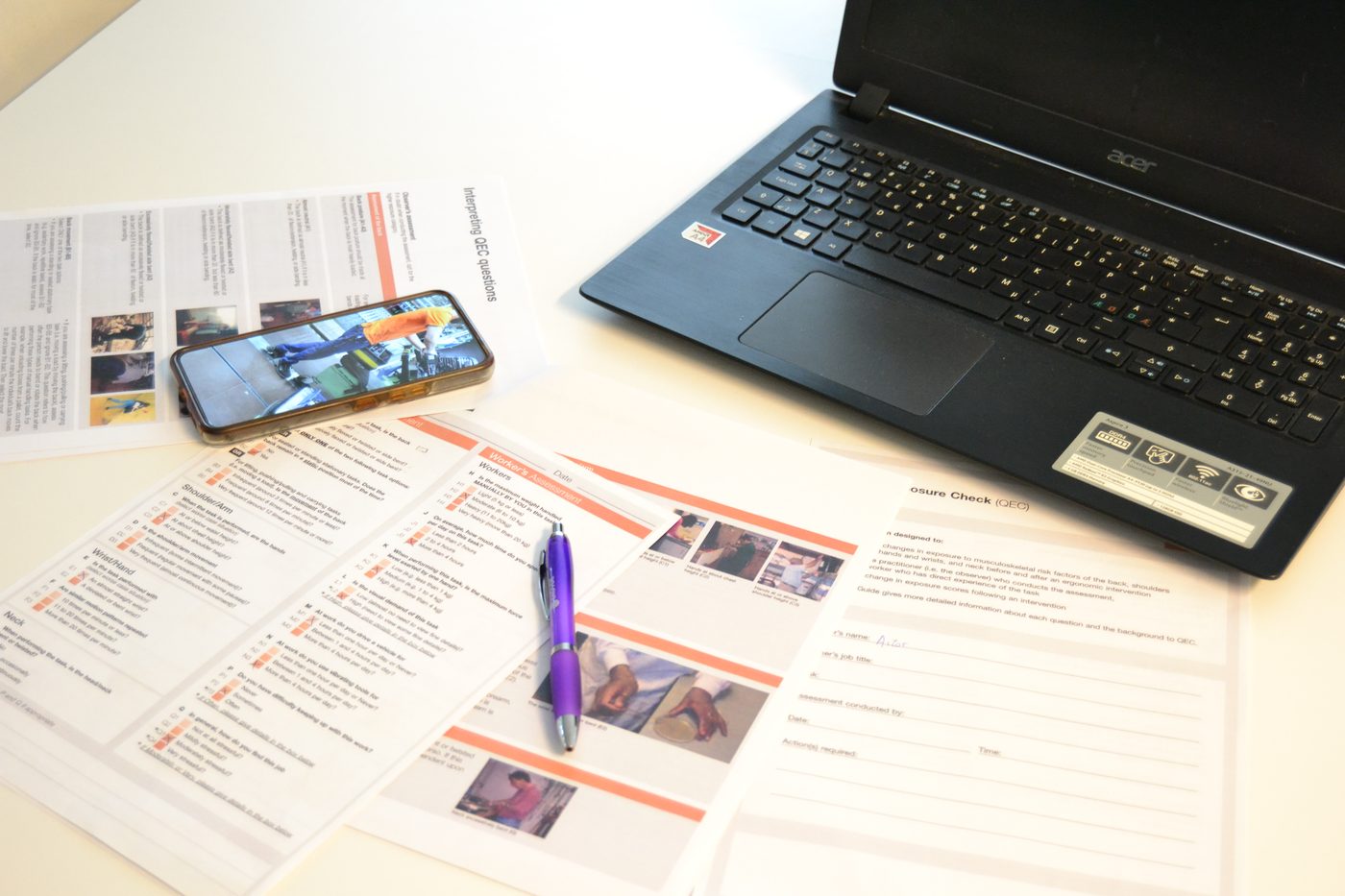
An ergonomist uses paper forms beside a laptop and a phone on a workshop table
Before

Manual scoring on paper

Paper forms, a stopwatch and observation by eye take hours per workstation, and a change of the workstation means starting over. The assessment depends on the specialist who is in the room, and a small company seldom has one.

With EasyErgo

Standard scores from a recording, in minutes

The recording was filmed with a phone, and EasyAI rebuilt the posture beside it from the video, frame by frame. The RULA score of every frame is drawn under the two, the high risk moments are found without anyone watching the video, and any method is run again on the same recording in seconds.

The 3D body is loading.
The body turns with the mouse or a finger.
RULA7
Very high riskFrame 1 of 484
Upper arm4100°Neck4−16°
Lower arm2Trunk3−15°
Wrist2twist 1Legs1
LowMediumHighVery high

EasyErgo was born at the University of Skövde and works at Science Park Skövde.

University of Skövde Science Park Skövde Feelgood
Med finansiering från Vinnova Chalmers Innovationskontor KK-stiftelsen

Through the project AIRGO (KK-stiftelsen) we work with Skandia Elevator and Alfa Laval on the assessments of their own workplaces.

Skandia Elevator Alfa Laval

From a recording to the risk scores in four steps.

Everything runs in the browser, and the whole pipeline takes minutes instead of the days of a traditional ergonomic study, so the results are shown in the room, on the same visit.

1

Capture

The workstation is filmed with any camera, and a phone is enough. The video is uploaded to the EasyAI gallery, where the faces and the background can be blurred.

2

Process

EasyAI rebuilds the posture of the worker in 3D, frame by frame, in about three minutes per minute of video, which is fast enough to discuss the findings on the spot.

3

Score

The assessor chooses a method and types the load and the frequency, and the standard risk scores come with a chart per frame and with the high risk frames marked.

4

Export

The results go to the simulation tool, to the PLM system or out as a Word report, i.e. OSIM and MOT for OpenSim, MVNX for Xsens, and JSON, CSV and GLB.

Eight standard methods, implemented from their published sources.

One recording serves every method, since the posture is measured by EasyAI and only the inputs the video cannot show are typed. Every method page shows its references and the deviations and assumptions of the implementation. One licence covers the videos you need, with no fee per video and no surprise per seat. A published method that the platform lacks is added at no cost, and the scoring rules of a company are built as a paid integration with the same capture, the same workflow and the same exports, so a company that needs its own rules can write to us.
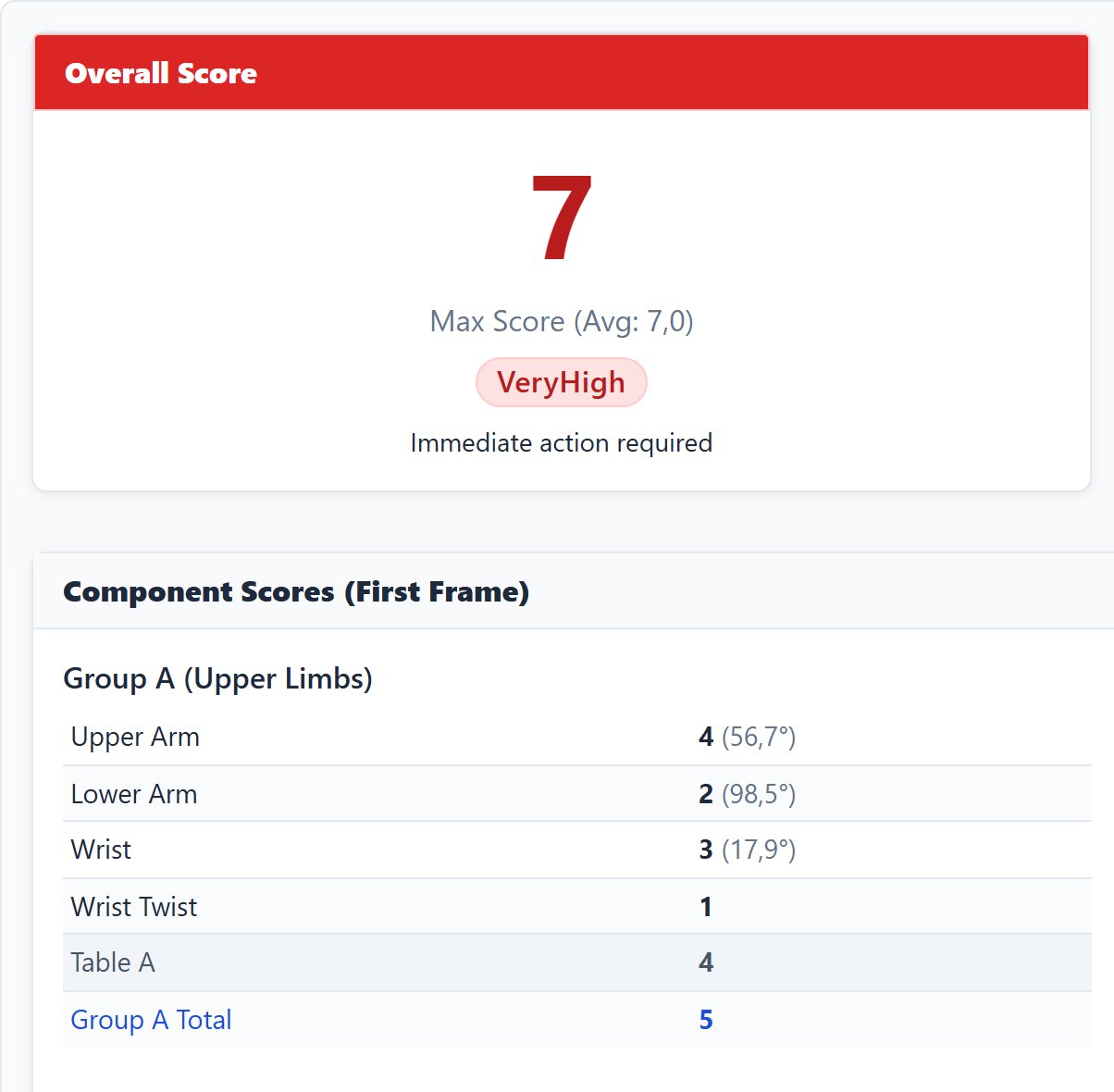
The result of a RULA evaluation in the dashboard, with a score of 7, very high, immediate action required, and the scores of the upper arm, the lower arm, the wrist and the wrist twist

RULA

Rapid Upper Limb Assessment
Assesses
RULA assesses the load on the neck, the trunk and the upper limbs in one posture, for work that is done mainly with the arms.
From the recording
The recording gives the joint angles of the upper arm, the lower arm, the wrist, the neck, the trunk and the legs, in every frame of a video or in a photo.
Typed by the user
The user types the muscle use and the force or load, and the detected angles can be adjusted before the evaluation is run again.
Result
The score runs from 1 to 7 with four action levels, and for a video the level of the recording is the 95th percentile over the frames.
Reference
McAtamney, L. and Corlett, E. N. (1993). Applied Ergonomics, 24(2), 91 to 99.
1, 2 acceptable3, 4 investigate5, 6 change soon7 change now
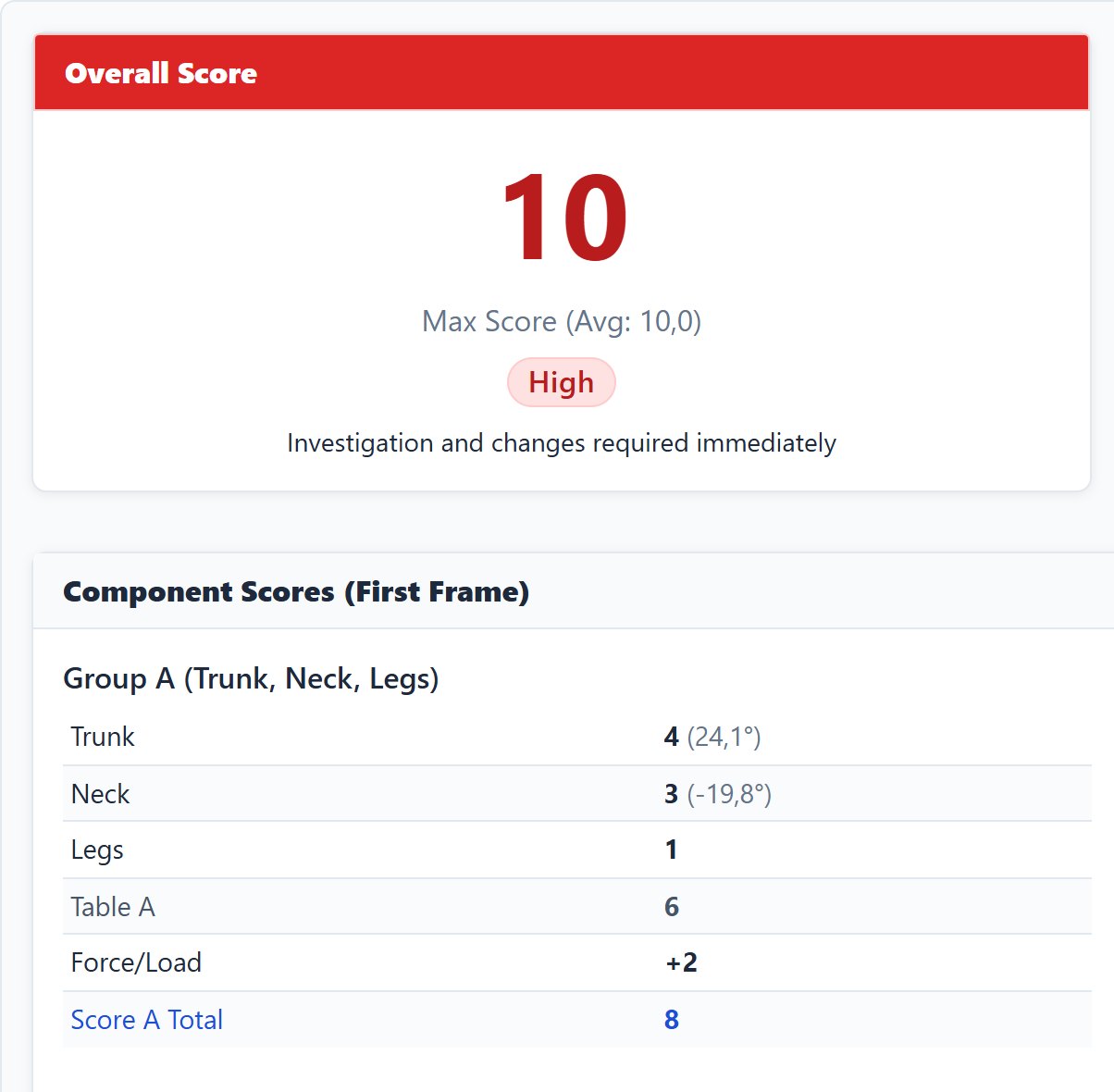
The result of a REBA evaluation in the dashboard, with a score of 10, high, and the scores of the trunk, the neck and the legs

REBA

Rapid Entire Body Assessment
Assesses
REBA assesses the load on the whole body in one posture, with the legs, the load that is handled and the grip, for the varied postures of health care and service work.
From the recording
The recording gives the joint angles of the trunk, the neck, the legs, the upper arm, the lower arm and the wrist.
Typed by the user
The user types the load or force, the coupling and the activity.
Result
The score runs from 1 to 15 with five levels of risk, i.e. 1 negligible, 2 to 3 low, 4 to 7 medium, 8 to 10 high and 11 to 15 very high.
Reference
Hignett, S. and McAtamney, L. (2000). Applied Ergonomics, 31(2), 201 to 205.
1 negligible2 to 3 low4 to 7 medium8 to 10 high11 to 15 very high
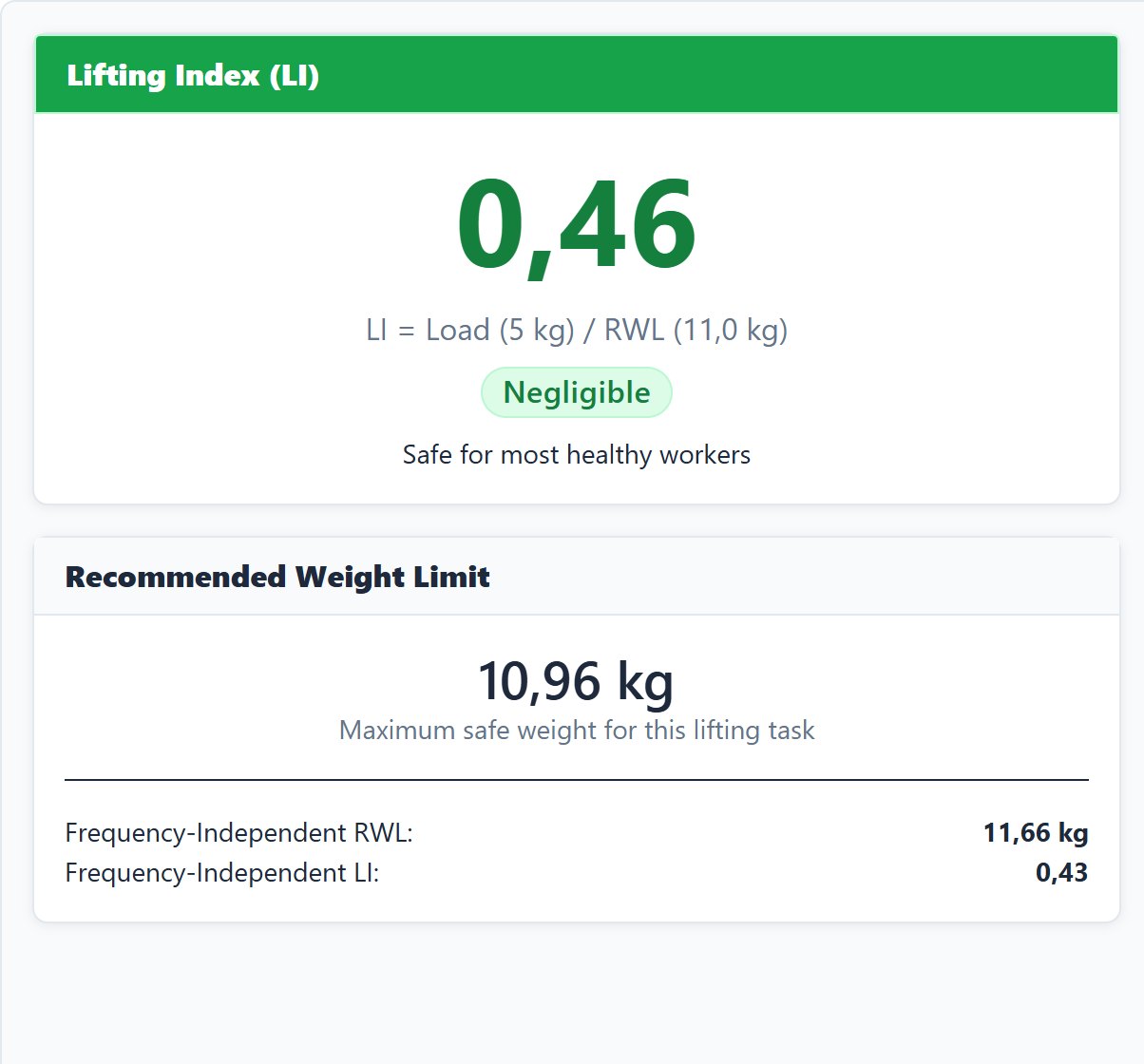
The result of a NIOSH evaluation in the dashboard, with a lifting index of 0.46, negligible, and a recommended weight limit of 10.96 kg

NIOSH

Revised NIOSH lifting equation
Assesses
The equation gives the weight that nearly all healthy workers can lift in a two handed lift over a shift, i.e. the recommended weight limit, and the ratio of the load to it, i.e. the lifting index.
From the recording
Two photos, one at the origin and one at the destination of the lift, give the horizontal and the vertical position of the hands and the asymmetry angle, and the distances can also be typed.
Typed by the user
The user types the load, the frequency, the duration and the coupling.
Result
The weight limit and the lifting index are given at both ends of the lift, and an index above 1 means an increased risk for some workers.
Reference
Waters, T. R., Putz-Anderson, V., Garg, A. and Fine, L. J. (1993). Ergonomics, 36(7), and the applications manual of 1994.
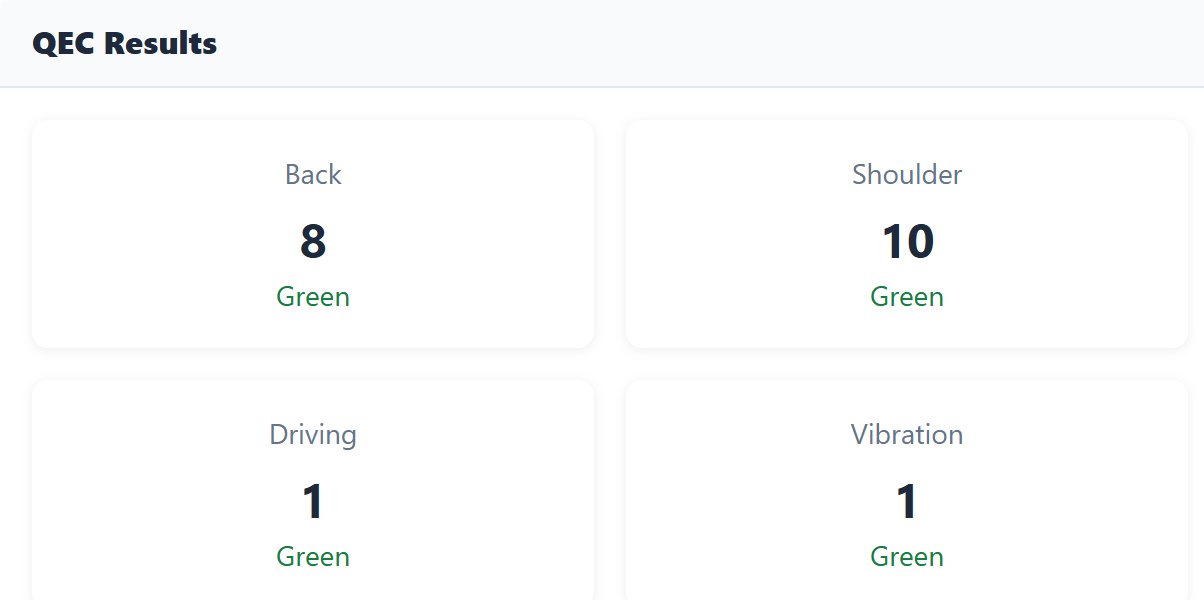
The result of a QEC evaluation in the dashboard, with the exposure scores of the back and the shoulder, and of driving and vibration

QEC

Quick Exposure Check
Assesses
QEC assesses the exposure of the back, the shoulder and arm, the wrist and hand and the neck to risk factors for musculoskeletal disorders, as the observer and the worker see it, together with driving, vibration, work pace and stress.
From the recording
The answers on the back posture and on the height of the hands are suggested from a photo.
Typed by the user
The user answers the other questions of the observer and the eight questions of the worker.
Result
The result is an exposure score per body region and one for each of the four other factors, each with one of four levels.
Reference
David, G., Woods, V., Li, G. and Buckle, P. (2008). Applied Ergonomics, 39(1), 57 to 69.
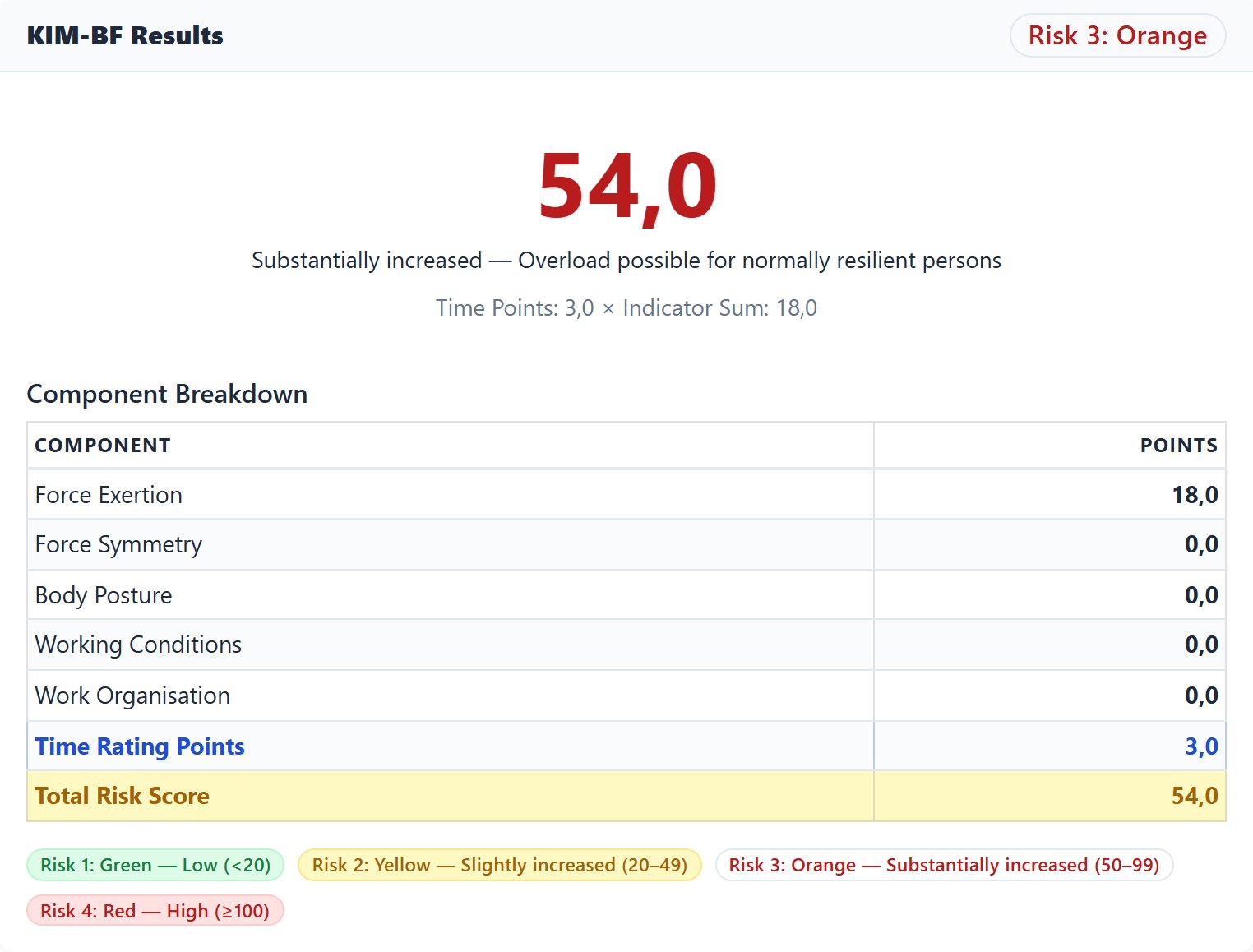
The result of a KIM evaluation in the dashboard, the form for whole body forces, with a risk score of 54, risk 3, and the points of every indicator

KIM

Key Indicator Methods
Assesses
KIM assesses the physical workload of one type of activity per form, in six forms: lifting, holding and carrying, pushing and pulling, manual handling operations, awkward body postures, whole body forces, and body movement.
From the recording
The posture indicators of the chosen form are suggested from a photo.
Typed by the user
The user types the loads, the frequencies, the durations and the conditions of the work.
Result
The risk score is the time rating times the sum of the indicator points, read against four ranges, i.e. below 20, 20 to 50, 50 to 100, and 100 or more.
Reference
Bundesanstalt für Arbeitsschutz und Arbeitsmedizin (2019), MEGAPHYS, and Klussmann, A. et al. (2017), BMC Musculoskeletal Disorders, 18, 184.
below 2020 to 5050 to 100100 or more
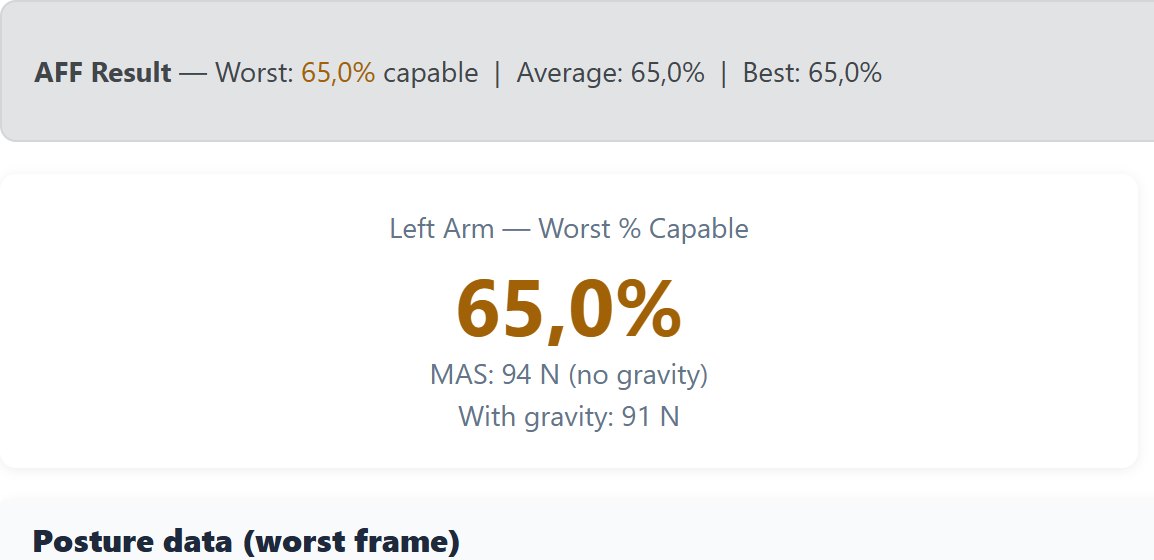
The result of an AFF evaluation in the dashboard, with the share of the population capable, 65 percent for the left arm

AFF

Arm Force Field
Assesses
AFF gives the force a population can exert with one arm at a given position of the hand and direction of the force, and from it the share of the population able to exert the required force.
From the recording
The recording gives the position of each hand relative to the shoulder.
Typed by the user
The user types the body mass, the stature, the sex, the required force with its direction, the share of the population to design for, and the frequency and duration of a repeated effort.
Result
The result is the share of the population that is capable, per arm, in five levels from 90 percent or more to below 25 percent, and for a repeated effort the maximum acceptable force.
Reference
La Delfa, N. J. and Potvin, J. R. (2017). Applied Ergonomics, 59, 410 to 421, and Potvin, J. R. (2012). Human Factors, 54(2).
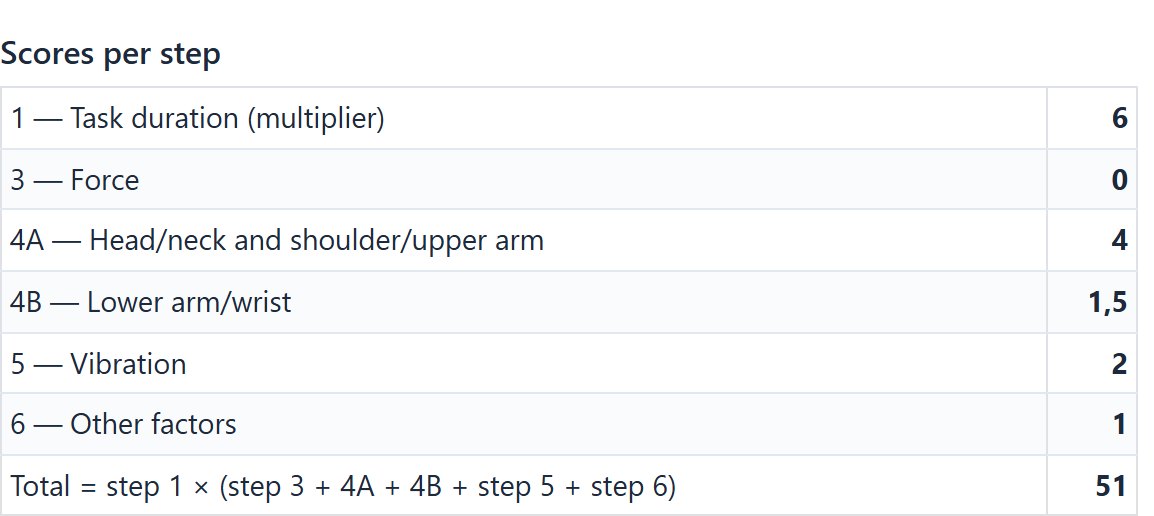
The result of a HARM evaluation in the dashboard, with a total risk score of 51, red, and the score of every step

HARM 2.0

Hand Arm Risk assessment Method
Assesses
HARM assesses the risk of arm, neck or shoulder complaints in a task that is done with the hands and arms.
From the recording
The recording gives the shares of the task time in each posture of the neck, the shoulder, the arm and the wrist, measured over the frames of the video.
Typed by the user
The user types the duration of the task, the most active hand, the force exertions, vibration and the other factors.
Result
The result is a risk score for the most active hand with three levels, green, orange and red.
Reference
Douwes, M. and de Kraker, H. (2014). International Journal of Industrial Ergonomics, 44(2), 316 to 327, and the page follows the form of HARM 2.0 of TNO.
greenorangered
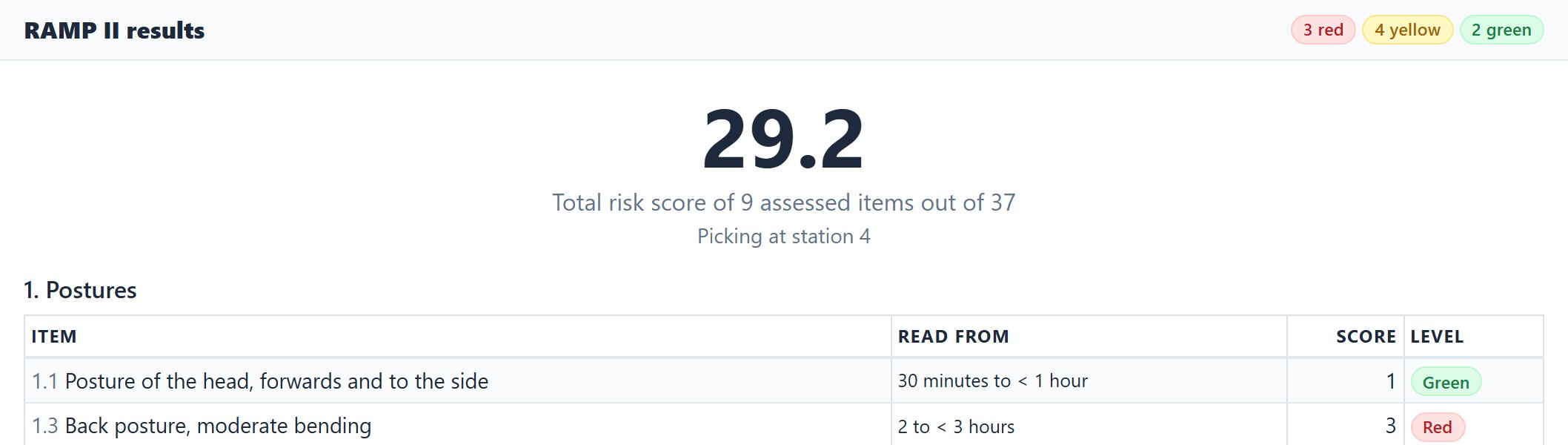
The result of a RAMP II evaluation in the dashboard, with a total risk score of 29.2 over nine assessed items, and the posture items with what each was read from, its score and its level

RAMP II

Risk Assessment and Management tool for manual handling Proactively
Assesses
RAMP II assesses the risk of musculoskeletal disorders in manual handling work over a work day, in seven areas: postures, work movements and repetitive work, lifting, pushing and pulling, influencing factors, reports on strenuous work, and perceived discomfort.
From the recording
A workday built from recordings fills the times of the postures and the recovery items, and a frame of a video gives the zones of a lift and the gripping height of a push.
Typed by the user
The user types the times per work day, the classes, the yes or no questions, and the cases of hand force, lifting and pushing.
Result
The result is a score and a level, green, yellow or red, per item, with the sum of the scores and the number of items per level for the job.
Reference
Lind, C. M., Forsman, M. and Rose, L. M. (2020). Ergonomics, 63(4), 477 to 504, and the page follows version 2.0 of the method of KTH Royal Institute of Technology.
greenyellowred

EasyErgo is a Swedish company born from research at the University of Skövde.

Every method in EasyErgo comes from the published literature, and the source and the calibration version are stored with every result. The platform grew out of years of peer reviewed work in digital human modelling and in the optimization of productivity and worker well-being.

  • Doctoral thesis at the University of Skövde (2023)
  • Publications in Advanced Engineering Informatics, Sustainability and IISE Transactions on Occupational Ergonomics and Human Factors, and in the proceedings of IEA, SPS, DHM and AHFE
  • Every method is traceable to its source, i.e. La Delfa and Potvin for AFF, BAuA for KIM, the revised NIOSH equation, RULA, REBA and QEC as published, HARM 2.0 of TNO and RAMP II of KTH
Read the publications

Teams that are new to ergonomics get help from us.

A platform is not enough when a team starts from scratch on workplace ergonomics, so our ergonomists work with the team until the assessments are a routine of its own.

  • Hands-on onboarding

    We walk your team through the first evaluations on real workstations, i.e. the capture, the scoring and the report, until it is a routine your people own.

  • Ergonomics fundamentals

    Short and practical training on the methods that matter for your work, so that your team understands the scores instead of only seeing them.

  • Guideline compliance

    We help you map your processes to the relevant occupational health guidelines, so that the work can be shown to have been done.

  • A clear return

    We help you measure what the redesign of a workstation saves in time, sick days, rework and claims, so that the investment is easy to defend.

Write to us about onboarding

Ergonomics is taught inside the tool.

A course of 22 modules in five parts teaches ergonomics from the ground up, from what ergonomics is and the three dimensions of exposure to every method with its criteria and how EasyErgo is used. Every module is a deck of short cards with a figure, shown one card at a time, and an administrator can edit the cards for the company.

A card of the course inside the dashboard shows the cube model, with posture, force and time as the three axes of a cube, its title, its text and its references

The API and the files fit your own workflow.

Everything the dashboard does is available as an HTTP API with a key. A video goes in, the posture files and the scores come out, and your own tools, simulation models or quality systems use them without anyone opening the dashboard.

A diagram in which a phone, other motion capture and the assessor send a video, a TRC file and the inputs to the EasyErgo API, where EasyAI rebuilds the posture and eight methods score it, and from which JSON goes to the systems of the customer, files to the simulation and biomechanics tools, and Word reports to the reader

Markers from another motion capture system go in as a TRC file and come back scored with the same methods, so any skeleton can use the methods of EasyErgo.

A key is created by an administrator on the API keys page of the dashboard, and Python examples of every call come with it.

The files fit the simulation and analysis tools you already use.

The posture, the 3D body, the scores and the reports leave the platform as JSON, CSV, GLB and Word, as OSIM and MOT for OpenSim, as MVNX for Xsens, and as a motion file with a manikin for IPS IMMA.

IPS IMMA
Siemens Process Simulate and Jack
Delmia
Xsens MVN Analyze
OpenSim

Every workstation can be assessed, and not only a sample.

The dashboard is open to you, and one message to us is enough for us to help you run the first evaluation.